
Guides
-
State Machines in GameMaker
State Machines in GameMaker: A Simple Beginner-Friendly Guide If you’ve ever written code like this: you’ve already started building character behavior. But as your game grows, managing different actions like walking, jumping, attacking, climbing, and dying can quickly become messy. That’s where state machines come in. In this tutorial, we’ll build a simple state machine…
-
Learn GML: Enums
Introduction Let’s consider the code below: This works, but what does “1” actually mean in this context? Is it one of the four cardinal directions? Is it an angle? Who knows! This is where enums come in. Enums (short for enumerators) let you replace confusing numbers with readable names, making your code easier to understand.…
-
How GameMaker Works
The Basics GameMaker builds games by combining different kinds of assets that work together. Each type has a clear purpose, and together they form the foundation of your game. Rooms A Room is like a level or scene. It contains everything that appears on screen, such as the player, enemies, walls, and backgrounds. Every GameMaker…
-
Learn GML: Variables
What is a Variable? A variable is a container that has a name and holds onto a piece of information you want to remember, change, or use later. In GameMaker, variables are how your game keeps track of things. They store numbers, text, and all sorts of data inside your game. Almost everything in coding…
-
Learn GML: Code Blocks
In GameMaker, code is written in blocks. A block is a group of instructions, called statements, that tell your game what to do. Each statement runs in order, and together they create the logic behind your game. A code block can do something simple, like add two numbers, or something complex, like make an enemy…
-
How to Learn GML in GameMaker
Every game you’ve ever played, whether it’s jumping across platforms, collecting coins, or dodging enemies, started with a conversation. A creator gave their game a list of instructions, and the game listened. That’s what GML, or GameMaker Language, is all about. It’s the language GameMaker speaks so you can talk to your game and tell…
-
Rooms
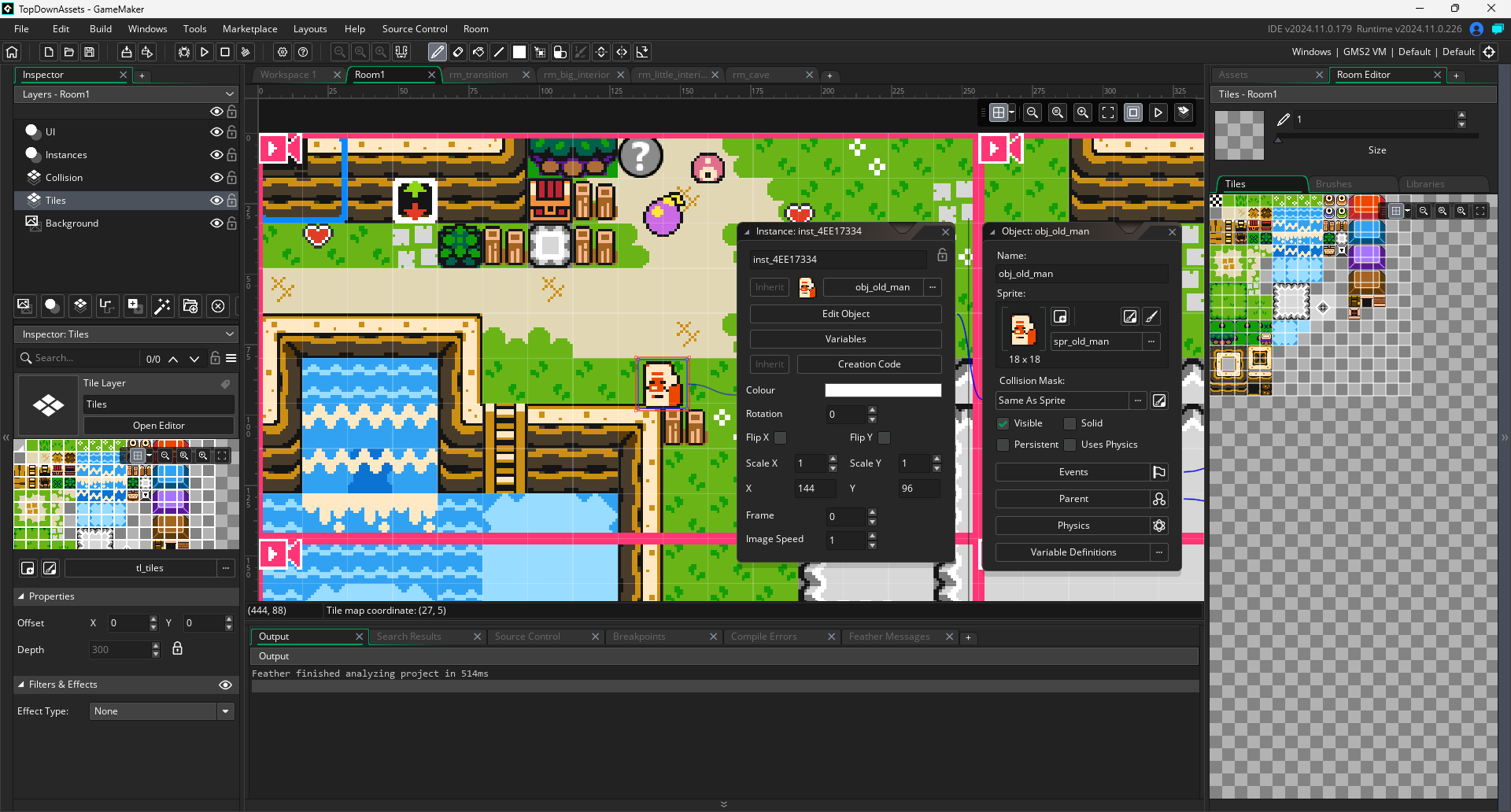
In GameMaker, a Room is where your game actually happens. Think of it like a stage or scene in a play. A room is where you place objects, sprites, backgrounds, and more to bring your game to life. Rooms are the foundation that holds everything together. What a Room Does A Room is a container for the different…
-

direction
direction is a built-in variable. It stores an angle, in degrees, that represents where the object is heading. By default, direction is 0. This means that unless you tell it otherwise, all objects will be moving to the right when they’re set in motion using other built-in variables.
-

Choosing a GameMaker Project
One of the first challenges as a game developer is deciding what kind of game to make. If your project is too big, you risk burnout. If it is too small, you miss the chance to grow. The key is to pick something that matches your current skill level and then move up step by…